Homebrew · recommended
brew install --cask hoangperry/herminal/herminalInstalls the signed + notarized build; brew upgrade --cask herminal keeps it current.
macOS · Apple Silicon · MIT
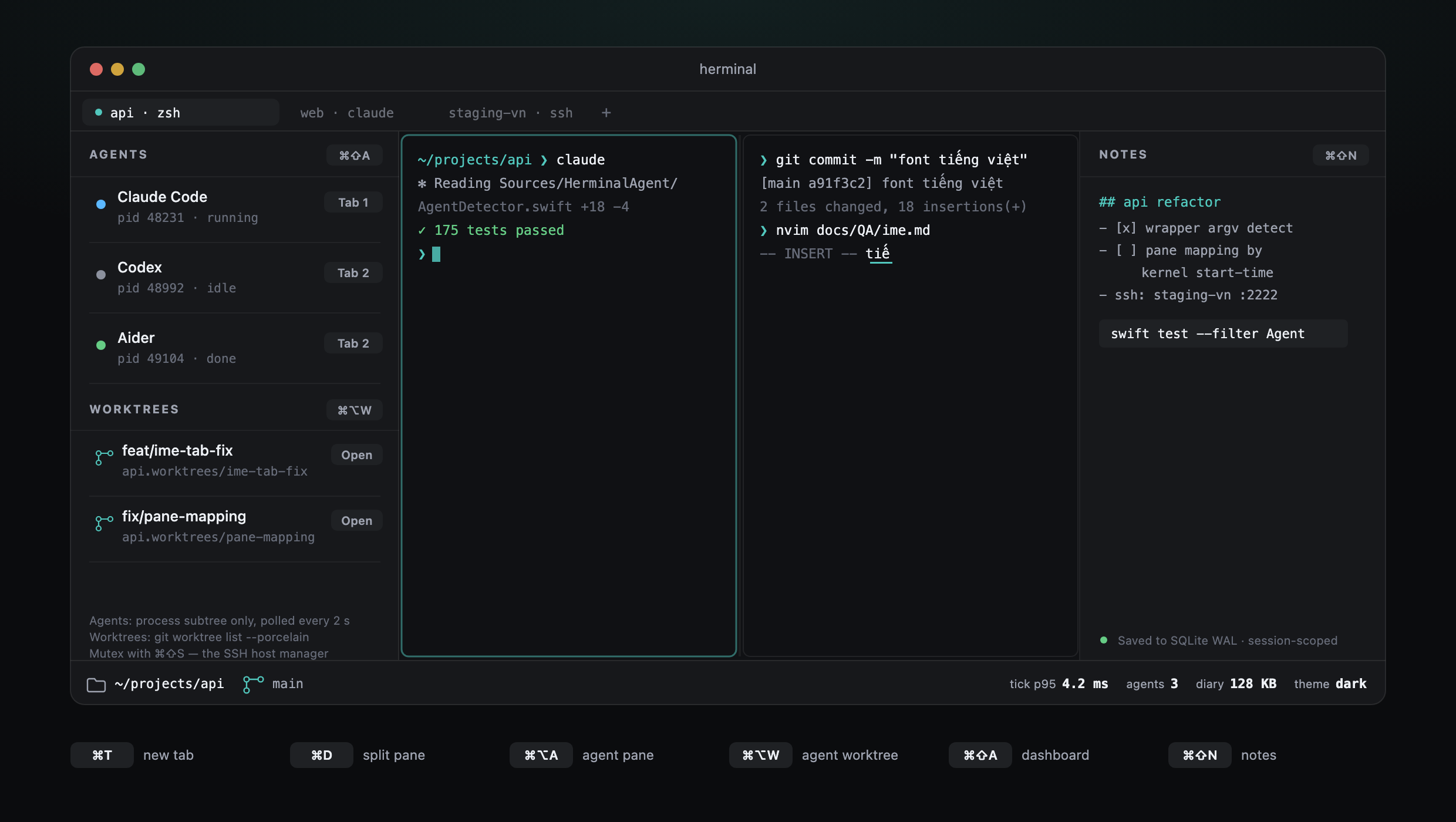
herminal pairs libghostty — Zig core, native Metal renderer, sub-5 ms keystroke latency — with a Swift/AppKit shell that owns the Vietnamese IME, the agent dashboard, and the per-session notes you'd otherwise paste into Notes.app.
| Native speed | VN IME | tmux compat | Agent dashboard | Local notes | |
|---|---|---|---|---|---|
| iTerm2 | ✓ | ✓ | ✓ | ✗ | ✗ |
| Warp | ~ | ✗ | ~ | ~ | ✗ |
| Wave | ~ | ✗ | ✗ | ✗ | ✗ |
| Ghostty | ✓ | ✓ | ✓ | ✗ | ✗ |
| herminal | ✓ | ✓ | ✓ | ✓ | ✓ |
Every macOS terminal in 2026 misses part of the picture. herminal is everything iTerm2 gets right, plus the two things 2025-era terminals decided to skip.
Agent dashboard
When claude, codex, or aider runs in any
tab, the dashboard catches it within 2 seconds — including
npm-installed (npx @anthropic-ai/claude-code) and Python-wrapped
(python3 -m aider) processes that hide behind a generic
node / Python name.
sysctl(KERN_PROCARGS2), not just process name┌──────────────────────────┐ │ AGENTS 3 │ ├──────────────────────────┤ │ ● Claude Code Tab 1 │ │ pid 53241 · running │ │ │ │ ● Codex Tab 2 │ │ pid 53244 · needs in… │ │ │ │ ○ Aider Tab 3 │ │ pid 53289 · idle │ └──────────────────────────┘
Agent cockpit · v1.0
The dashboard tells you what's alive. The cockpit is how you start it — and how you keep two agents from editing the same working tree at the same time.
Creates ../<repo>.worktrees/<branch> with
git worktree add and opens it in a new tab running the agent you
pick. Two fixes in flight, two real checkouts, no stashing. Remove always
confirms and never passes --force.
Splits or opens a tab already running claude in the current
directory. ⌘⌥G does the same for lazygit, and
⌘1–⌘9 jump straight to a tab once you have several.
New / Named… / Attach… from the dashboard, Window menu, or
⌘⇧P. Rows show last activity, folder, and window titles;
the one attached here is marked Here. Kill always
confirms.
Worktree paths are validated before creation, and the spawned command is
whitelisted — the cockpit runs claude, codex,
aider, lazygit or a plain shell, nothing arbitrary.
Sessions · v0.4
The terminal built for living inside Claude Code remembers your work — both the conversations and the workspace around them.
Reads Claude Code's own store (~/.claude/projects) and lists every
project you've run claude in, by recency, with the real working
directory and git branch. One click resumes the exact
conversation — claude --resume in the right cwd.
Quit with three tabs and a split, relaunch to the same layout — each pane back in its last directory. No rebuilding your workspace every morning. Toggle it off in Settings if you'd rather start clean.
Save a tab + split layout under a name (⌃⌘S) and reopen it any
time from Window → Open Workspace. Like iTerm2's window
arrangements — one for each project you bounce between.
Safe by default: restore replays the layout + directory only — no surprise
ssh connections or LLM resumes on launch. Opt into re-run supported launches
in Settings when you do want the whole session back. Replay uses structured,
allowlisted SSH, Claude, tmux, and agent intents — never raw shell strings.
Read-only against ~/.claude, built on OSC 7 working-directory tracking —
every pane knows where it is, so the terminal can put it back.
Vietnamese Telex
tieesng vieejt → tiếng việt
First try, in vim, in tmux, in a fast-typing burst. NSTextInputClient
bridge verified against a 20-phrase smoke checklist before every release.
KR / JP / CN smoke matrices ready for the next audience expansion.
The Vietnamese IME ladder is the kind of thing macOS handles correctly out of the box and that Electron terminals reliably break.
SSH manager
~/.ssh/config.Reads your existing config. Wildcard + Match blocks skipped, concrete Host blocks upserted as rows.
Spawns ssh user@host in a new tab, inheriting your shell + Telex IME.
Keys + passwords stay where you put them today. We add a UI layer, not a security boundary.
You're not migrating; you're skinning what already works.
Per-session notes
Each tab has its own SQLite-backed note. Autosaved. Markdown round-trip via File → Export / Import. The notes don't get shipped to a cloud, don't get scraped for training data, don't sync to a marketing CRM.
Lives at
~/Library/Application Support/herminal/notes.db
┌─────── Notes ────────────┐
│ ▌ scratch.md             │
│                          │
│ # debug session #4       │
│ - reproduced w/ M2 max   │
│ - libghostty surface ok  │
│ - check tick at 60Hz     │
│                          │
│   [⌘⇧N to toggle]        │
└──────────────────────────┘
Polish
A terminal lives or dies on the surface you touch every second. The v0.3 wave spent four releases making that surface feel like macOS rather than a wrapper around a render engine, and v1.0 closed the last "every terminal has this" gaps.
Live match highlighting, count chip, ⌘G / ⌘⇧G to walk hits. Powered by libghostty's own search engine — no buffer scraping.
Fuzzy launcher over every action — tabs, splits, sidebars, theme, settings. Raycast muscle memory, in a terminal.
Global hotkey drops herminal in front of any app, then tucks it away. No accessibility prompt — Carbon-registered.
Resize the grid without reopening a pane or editing a config file. The window keeps its frame; the terminal reflows.
Blow the focused pane up to fill the tab, then drop back to the split. For the moment a stack trace does not fit in a third of the window.
Grab the divider between panes and rebalance. Ultrawide-friendly; the old fixed 50/50 is gone.
NSVisualEffectView background blur + 6 px content padding + spring animation. The chrome reads as one intentional macOS panel.
I-beam cursor over text, clickable URLs, right-click menu, shell-set tab titles, exit closes the pane. The details you only notice when they're missing.
Diagnosed brutally, fixed methodically — the full audit is at docs/research/09-polish-audit.md.
v0.5 · workspace
v0.5 rebuilt the pane layout as a real binary tree, then made it feel native: split any pane again along either axis, move focus by direction, always see where you are.
Any pane splits again, nesting arbitrarily deep — editor left, two stacked shells right. ⌘D / ⌘⇧D split the focused pane in place. The old single-axis limit is gone.
Move focus to the nearest pane in a direction, spatially — the way iTerm2 and tmux do. Cycling stops being enough once panes nest.
A thin accent border marks the active pane, so you always know where the keyboard goes. Mouse-transparent — it never eats a click or a divider drag.
⌘T and splits inherit the focused pane's directory (OSC 7) — split in ~/proj, land in ~/proj, like Terminal.app and iTerm2.
The driver tick drops 60 Hz → 10 Hz when the window is fully hidden, so herminal stops burning CPU rendering a window no one's looking at. The PTY keeps draining on its own thread.
Opt in (off by default) and session restore replays structured SSH, Claude, tmux, and agent launches, not raw shell strings — the whole session back, on your terms.
The recursive layout went through a parallel code + security review before shipping
— it caught a real crash (a deeply-nested workspace.json could overflow
the decoder), now fixed and regression-tested. See
docs/REVIEW.md.
These are load-bearing. PRs to add them get politely declined.
Built with discipline
Full retrospective for each month at docs/backlog/.
brew install --cask hoangperry/herminal/herminalInstalls the signed + notarized build; brew upgrade --cask herminal keeps it current.
curl -LO https://github.com/hoangperry/herminal/releases/download/v1.0.0/herminal-v1.0.0.dmg
open herminal-v1.0.0.dmg
Signed + notarized + stapled. Gatekeeper accepts the Developer ID.
git clone --recurse-submodules https://github.com/hoangperry/herminal
cd herminal
Scripts/bootstrap.sh
Scripts/make-app-bundle.sh
open .build/herminal.app
Status + next